


iPhone Ringtone Maker
- The best custom iPhone ringtone maker
- Make iPhone ringtones from any video/audio formats
- Transfer M4R ringtone to your iPhone/iTunes after making iPhone ringtone
- Transfer M4R ringtones from PC to iPhone, and backup iPhone ringtones to PC/iTunes
- Supports iPhone, iphone 3G, iPhone 3GS, iPhone 4, CMDA iPhone 4,iPhone 4S, iPhone 5, the newest iOS 6 and iTunes 11

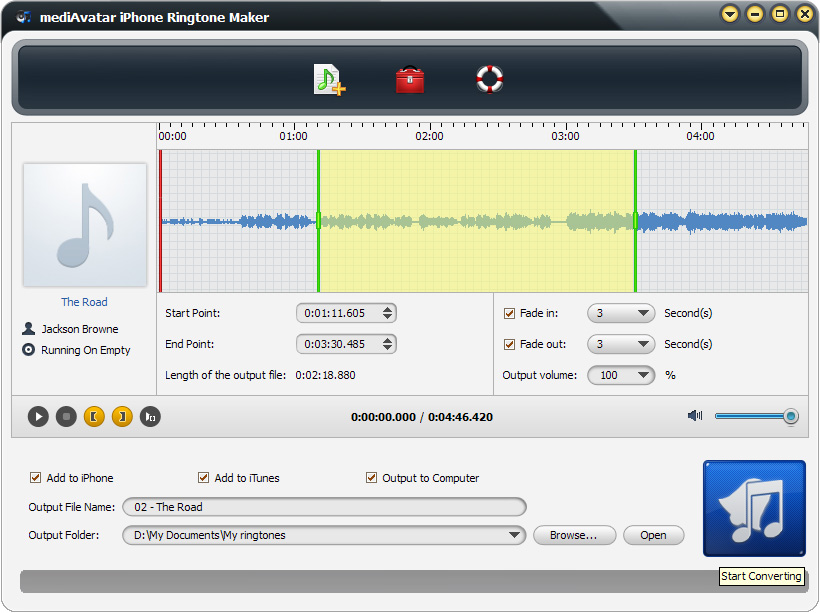
mediAvatar iPhone Ringtone Maker is one of strongest iPhone ringtone converter software currently available to make iPhone ringtones of your own! With mediAvatar iPhone Ringtone maker you can trim and make any music segment into M4R iPhone ringtone from all popular audio and video formats (AVI, MPEG, WMV, DivX, MP4, H.264/AVC, AVCHD, MKV, RM, MOV, XviD, 3GP, MP3, WMA, WAV, RA, M4A, etc.). Not only the best choice to make personalized iPhone ringtones with fading effects, you can also use this iPhone ringtone maker to export the ringtones to your iPhone or iTunes directly.
You can even backup your iPhone ringtones to PC or iTunes, and transfer M4R ringtones from PC to iPhone! Isn't it amazing?
*** mediAvatar iPhone Ringtone Maker can not convert protected music and video files.
 Output Device(s) & File Format(s) Support
 Output Device(s) & File Format(s) Support
Output Devices Supported | |
| iPhone, iPhone 3G, iPhone 3GS, iPhone 4, CDMA iPhone 4, iPhone 4S, iPhone 5 iOS 7 iTunes 11 | |
Input File Formats Supported | |
| Video | AVI, MPEG, WMV, MP4, FLV, MKV, H.264/MPEG-4, DivX, XviD, MOV, RM, RMVB, M4V, VOB, ASF, 3GP, 3G2, SWF, H.261, H.264, DV, DIF, MJPG, MJPEG, DVR-MS, NUT, QT, YUV, DAT, MPV, NSV AVCHD Video (*.mts, *.m2ts), H.264/MPEG-4 AVC (*.mp4), MPEG2 HD Video (*.mpg; *.mpeg), MPEG-4 TS HD Video (*.ts), MPEG-2 TS HD Video (*.ts), Quick Time HD Video (*.mov), WMV HD Video (*.xwmv), Audio-Video Interleaved HD Video (*.avi) |
| Audio | MP3, WMA, AAC, WAV, CDA, OGG, FLAC, APE, CUE, M4A, RA, RAM, AC3, MP2, AIFF, AU, MPA, SUN AU Format |
Output File Formats Supported | |
| Audio | M4R |
Make, transfer, backup, manage your iPhone ringtones with mediAvatar iPhone Ringtone Maker right now. Want more for your iPhone? Check iPhone Software Suite Pro!