
Current Page: Home > Products > iPhone Software Suite Pro
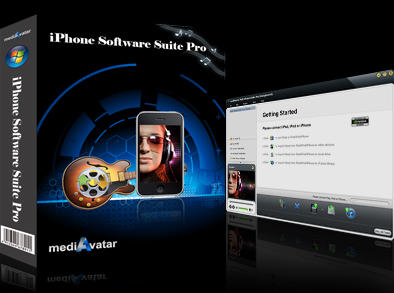
iPhone Software Suite Pro

iPhone Software Suite Pro

  • Transfer videos, music, photos, playlist from iPhone to PC, PC to iPhone, iPhone to iTunes, iPhone to iPod/iPhone
  • Transfer PDF/EPUB betwen iPhone and PC
  • Make iPhone ringtones from media files (Pro Only)
  • iPhone converter to convert and transfer DVDs, CDs, videos, audios to iPhone
  • Download+convert online videos to iPhone (Pro Only)
  • Manage, transfer, copy, backup, rip iPhone & iPod
  • Now newly support iOS 5 and iPhone 4S

Edition Comparison

iPhone Software Suite Pro
  • Download online videos to iPhone
  • Convert videos/audios to iPhone
  • Rip DVDs/CDs to iPhone
  • Copy music, movies, photos, books between iPhone and PC/iTunes
  • Create & transfer iPhone ringtones
iPhone Software Suite
  • Convert videos/audios to iPhone
  • Rip DVDs/CDs to iPhone
  • Backup iPhone music/movies/PDFs/photos to PC
  • Transfer music/movies/PDFs/photos to iPhone

Your iPhone is also your tiny mobile theatre. With mediAvatar iPhone Software Suite, any movies in almost all high-definition and standard-definition video formats or on DVD discs can be transferred to your iPhone. Meanwhile, any music format files and music CDs are also available to be imported to iPhone. You can even download and convert videos from popular video sharing sites like YouTube to iPhone, and make iPhone ringtones from any popular video format files.

But it's more than that. This mediAvatar iPhone Software Suite can backup your purchased iPhone videos and music to your computer or iTunes library in case of iPhone crash accidents. All the conversion and transfer features are also applicable to iPod.


Up to 50% Diccount Highlights of mediAvatar Products

Overview

  • iPhone converter, video to iPhone

    Video to iPhone Converter & Transfer

    Convert video files to iPhone movies and transfer them to iPhone directly: 3GP, 3G2, ASF, AVI, DV, DIF, VOB, FLV, M2TS, MTS, SWF, MKV, DVR-MS, MJPG, MJPEG, MOD, MPG, MPEG, MPA, DAT, TS, MPV, NSV, MOV, QT, H261, H264, RM, RMVB, WMV, ASF, etc.;
    Convert and transfer audio files to iPhone straight: AAC, AIF, AIFF, AC3, APE, CUE, AU, FLAC, MPA, MP2, MP3, OGG, RA, WAV, WMA, CDA, M4A, etc.

  • DVD to iPhone

    DVD to iPhone Converter & Transfer

    Rip and convert DVD movies to iPhone videos, also rip CD to iPhone music files, then copy converted DVDs and CDs to iPhone straight.

  • iPhone to PC transfer

    iPhone Transfer & Backup

    Transfer music, movies, PDFs and photos between iPhone and PC at superior fast speed;
    Backup iPhone music, videos, PDFs and photos to iTunes library;
    Manage multiple iPhone/iPod simultaneously and transfer files from iPod to iPhone, iPhone to iPod and iPod to iPod.

  • Make iPhone ringtones

    iPhone Ringtone Maker (Pro Only)

    Convert any popular video and audio formats into M4R as iPhone ringtones.

  • YouTube to iPhone, online videos to iPhone

    Online Video to iPhone Converter (Pro Only)

    Download & convert online videos from popular video broadcasting websites (YouTube, Metacafe, Dailymotion, Revver, Vililife, BREAK, Vimeo, Stickam, Blip.tv) then transfer online videos to iPhone directly.

  • iPad Software Suite Pro

Features

  • iPhone to iPhone transfer

    Supported Devices

    All iPhone/iPod models are supported:iPhone 4S, CDMA iPhone, iPhone 4, iPhone 3GS, iPhone 3G, iPhone 1st, iPod touch, iPod nano (5th Gen), iPod mini, iPod shuffle, iPod classic, etc.

  • iPhone to iPod, iPod to iPhone transfer

    Manage Multiple Devices Simultaneously

    Simultaneously connect multiple iPod and iPhone devices and manage their media files; transfer movies, music and photos among these iPhone and iPod; transfer the same files to multiple iPod and iPhone at one go.

  • iPhone backup to PC

    Recognize iPhone Device Info

    Recognize the connected iPhone and iPod, and display their detailed device information like type, capacity, version number, serial number and format for your information.

  • transfer iPhone playlists

    Manage & Transfer iPhone Playlists

    Not only manage iPhone playlists easily like iTunes, but also transfer iPhoneplaylists between multiple devices connected.

  • backup iPhone

    Manage iPhone Files

    Search for movies, music and photos you want quickly with Filter or Quick Search function; view iPhone music, videos, and photos as a list or thumbnails, and add illustrations to iPod music and movies in thumbnail mode.

  • backup iPhone

    The art of browsing

    You can have direct control over the organization of the collections by artist, genre, album, song, or playlist, which is really handy for users.

  • backup iPhone

    Thumbnail view

    View your music playlist in Thumbnail view. You can even choose the image from your computer to put it as a thumbnail image. Apply the image to whole genera or album or playlist.

  • backup iPhone

    Show in playlist

    You might build up a long list of playlists, with many songs in common. It's easy to lose track of which songs you've put on which playlists. To avoid duplicates, you can check a song and see which playlists it's already on and see all of the playlists the song belongs to.

  • manage iPhone music

    Edit ID3 Tag

    Allows to edit the ID3 tag of multiple music files at the same time for easier music management: name, artist, year, album and many others.

  • iPhone video transfer

    Built-in Media Player

    A media player is built-in enabling you to play iPhone videos/music and the loaded DVDs, CDs and videos.

  • backup iPhone to PC

    Convert & Transfer iPhone Files at High Speed

    This iPhone converter & transfer takes advantage of multi-core CPU to convert DVDs, videos and music at the possibly highest speed and uses the least amount of time to transfer videos and music between iPhone and PC.

  • manage iPhone

    Manage iPod as well

    This iPhone transfer is also a iPod transfer that can transfer, manage, backup iPod files, export the movies taken by iPod touch 4 to your PC or iTunes.

References

Output Devices Supported

iPhone, iPhone 3G, iPhone 3GS, iPhone 4, CDMA iPhone, iPhone 4S
iPod touch 4 and below, iPod nano 6 and below, iPod shuffle 4 and below, iPod classic, iPod mini, iPod
iOS 4.3, iOS 5.0 and below

File Formats Supported

Video

3GP, 3G2, ASF, AVI, DV, DIF, VOB, FLV, M2TS, MTS, M4V, SWF, MKV, DVR-MS, MJPG, CDA, MJPEG, MOD, MPG, MPEG, MPA, DAT, TS, MPV, NSV, MOV, QT, H261, H264, RM, RMVB, WMV, ASF, XWMV

Online videos from YouTube, Metacafe, Dailymotion, Revver, Vililife, BREAK, Vimeo, Stickam, Blip.tv
Audio AAC, AIF, AIFF, AC3, APE, CUE, AU, FLAC, MPA, MP2, MP3, OGG, RA, WAV, WMA, CDA, M4A, MP4
Image BMP, GIF, JPEG, PNG

System Requirements

System Requirements

OS : Microsoft® Windows XP (SP2 or later), Windows Vista, Windows 7
Processor : 1GHz Intel/AMD processor or above
RAM : 256MB RAM (512MB or above recommended)
Free Hard Disk : 100MB space for installation
Graphics Card : Super VGA (800×600) resolution, 16-bit graphics card or higher
Others : iTunes 8.2 or above, DVD-ROM drive, Internet Connection

Related Products