


iPhone Contact Transfer
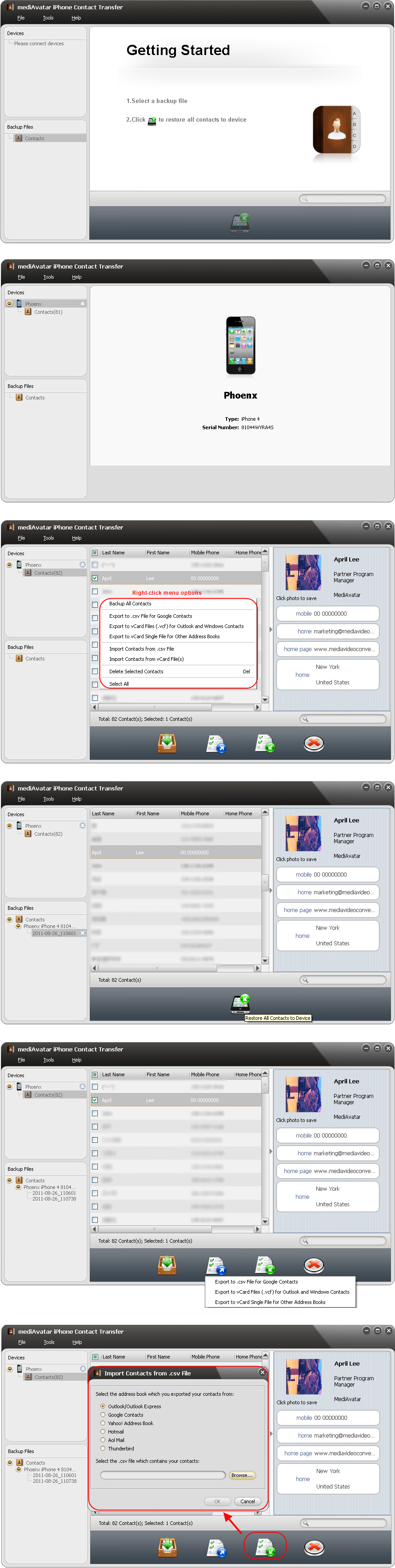
- Backup iPhone contacts to specific mediAvatar backup file and restore in future
- Export iPhone contacts to Google Contacts (.csv)
Export iPhone contacts to Outlook, Windows Contacts and other Address Books (vCard files) - Transfer your backup contacts from iCloud to your iPhone
- Import contacts to iPhone from Outlook/Express, Yahoo! Address Book, Google Contacts, Thunderbird, Skype and more Address Books exported files
- Support iPad, iPod, iPhone contacts transfer also
- View and manage contacts info conveniently

Easily backup and restore your iPhone contacts, simply share iPhone contacts with other Address Books. Import your backup contacts from iCloud. MediAvatar iPhone Contact Transfer provides an easy way to backup your iPhone contacts that you can backup iPhone contacts to the specific backup file that can be opened, edited, and restored to iPhone in one click. At the same time, you can export and backup the contacts to .csv file for Google Contacts or .vCard files for Outlook, Windows Contacts and other Address Books. In addition, this iPhone contacts transfer software enables you to import contacts from .csv file exported from Outlook/Outlook Express, Yahoo! Address Book, Google Contacts, Thunderbird, Aol Mail, Hotmail, and from vCard files exported from Google Contacts, Yahoo!, Windows Contacts, Fastmail, Skype and so on.
In this iPhone contact transfer software, you can sort the contacts by certain items, view the contact info in list mode and iPhone-contact mode, search and delete the contact(s) as easily as on iPhone.
 Output Device(s) & File Format(s) Support
 Output Device(s) & File Format(s) Support
Output Devices Supported | |
| iPhone, iPhone 3G, iPhone 3GS, iPhone 4, CDMA iPhone, iPhone 5, iPhone 5s, iPhone 5c iPod touch, iPad, New iPad, iPad Air, iPad mini iOS 7 iTunes 11 | |
File Formats Supported | |
| Backup file | csv, vCard |
Backup your iPhone contacts for future use; restore iPhone contacts from backups - mediAvatar iPhone Contact Transfer is a perfect solution.