
Current Page: Home > Products > iPhone Movie Converter Bookmark and Share

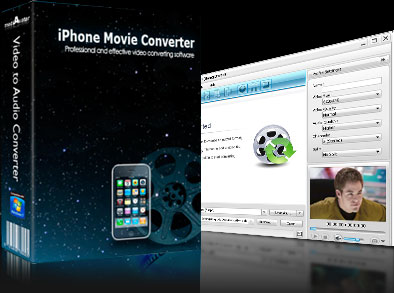
iPhone Movie Converter

  • Convert different video formats to iPhone video
  • Convert music files to iPhone music
  • Extract audio from video
  • supports TV output with 480p and wide screen.
$ 25.99$ 29.99
buy iPhone Movie Converter

As iPhone movie converter for converting videos for your iPhone, mediAvatar iPhone Movie Converter can convert nearly all video formats like AVI, MPEG, WMV, DivX, MOV, RM, VOB, YouTube videos to iPhone MP4 video. It's also a great iPhone music converter to convert popular music files like WMA, MP2, OGG, RA, AC3, APE, CDA to iPhone music MP3, WAV, M4A, and extract audios from video files and convert to MP3 for listening on your iPhone.
To make your iPhone video conversion flexible, mediAvatar iPhone Movie Converter provides more features and settings like splitting file, customizing file size and converting any segment. Now, with this powerful video to iPhone converter, you can convert your multimedia files to iPhone videos and watch them on the go!

Download mediAvatar iPhone Movie Converter for free now. It couldn't be easier!

Overview

  • iphone movie converter, convert video to iphone

    iPhone video clip

    Easily convert videos like AVI, MPEG, WMV, DivX, MOV, RM, VOB converted to iPhone video MP4.

  • convert video to iphone, convert iphone video

    iPhone music converter

    Convert WMA, MP2, OGG, RA, AC3, APE, CDA and such audios to iPhone-format audio MP3, M4A, WAV; extract audio/music from video files.

  • convert iphone video, iphone video converter

    iPhone picture converter

    This iPhone movie converter is the fastest way to turn your photos in JPG, GIF, PNG or BMP format into an iPhone video for sharing with friends.

  • iphone movie converter, convert iphone video

    Super fast conversion speed

    With CPU auto-detect, you'll get the highest iPhone video conversion speed.

Awards:

Features

  • mediAvatar iPhone Movie Converter

    Convert one to several files simultaneously

    Set diverse output profiles for one source at one time to get iPhone videos and music in one step with simpler operation and less time.

  • mediAvatar iPhone Movie Converter

    Output files with certain file size

    Choose between splitting one file into several ones with preset size for output or compressing a large file to the size you want with the Bitrate Calculator tool.

  • mediAvatar iPhone Movie Converter

    Convert any segment

    Convert any segment by setting the start point and duration as you like to remove the unwanted scenes.

  • mediAvatar iPhone Movie Converter

    More practical and classified settings

    Provides general and advanced settings of video and audio conversion; a large range of expert settings are especially directed to more advanced requirements when converting video to iPhone.

  • mediAvatar iPhone Movie Converter

    Ease of use

    From terse interface to batch conversion support, this video to iPhone converter makes it highly simple and quick to convert multiple iPhone videos and audios.

  • mediAvatar iPhone Movie Converter

    Run in background

    Running the iPhone video converter in background will lower its priority and get more efficiency on running other programs.

  • mediAvatar iPhone Movie Converter

    More features

    Preview source file prior to iPhone video conversion; take snapshot during preview; set after done action to save trouble.

  • mediAvatar iPhone Movie Converter

    Multilingual Interfaces

    Available in four language interfaces: English, German, French, Spanish.

Reference

Output Devices Supported

iPhone, iPhone 3G, iPhone 3GS, iPhone 4G

Input File Formats Supported

Video AVI, MPEG, WMV, MP4, FLV, MKV, H.264/MPEG-4, DivX, XviD, MOV, M4V, VOB, ASF, 3GP, 3G2, SWF, H.261, H.264, DV, DIF, MJPG, MJPEG, DVR-MS, NUT, QT, YUV, DAT, MPV, NSV AVCHD Video (*.mts, *.m2ts), H.264/MPEG-4 AVC (*.mp4), MPEG2 HD Video (*.mpg; *.mpeg), MPEG-4 TS HD Video (*.ts), MPEG-2 TS HD Video (*.ts), Quick Time HD Video (*.mov), WMV HD Video (*.xwmv), Audio-Video Interleaved HD Video (*.avi)
Audio MP3, WMA, AAC, WAV, CDA, OGG, FLAC, APE, CUE, M4A, RA, RAM, AC3, MP2, AIFF, AU, MPA, SUN AU Format
Image BMP, GIF, JPEG, PNG

Output File Formats Supported

Video MPEG, MP4, H.264/MPEG-4, MOV, MPEG-4
Audio MP3, AAC, WAV, M4A, AIFF
Image BMP, GIF, JPEG, PNG

SystemRequirements

SystemRequirements

OS : Microsoft® Windows XP (SP2 or later), Windows Vista, Windows 7
Processor : 1GHz Intel/AMD processor or above
RAM : 256MB RAM (512MB or above recommended)
Free Hard Disk : 30MB space for installation
Graphic Card : Super VGA (800×600) resolution, 16-bit graphics card or higher

Related Products